
Problem Statement
Organizations deal with massive volumes of raw data (like banking transactions), but this data is often:
1. Stored in CSV format (unstructured and inconsistent)
2. Contains dirty values (currency symbols, nulls, incorrect formats)
3. Slow to query due to row-based structure
4. Not directly usable for analytics or reporting
Because of this, business teams struggle to generate insights quickly. A solution is needed to clean, transform, and optimize data for fast querying.
Why This Approach (AWS Glue + S3 + Athena)
This approach is used because:
1. Serverless → No infrastructure management
2. Scalable → Handles growing datasets automatically
3. Cost-efficient → Pay only for usage
4. High performance → Parquet format improves query speed
5. Direct querying → Athena enables SQL queries on S3
This makes it ideal for modern data pipelines where speed, cost, and scalability matter.
Step-by-Step Implementation
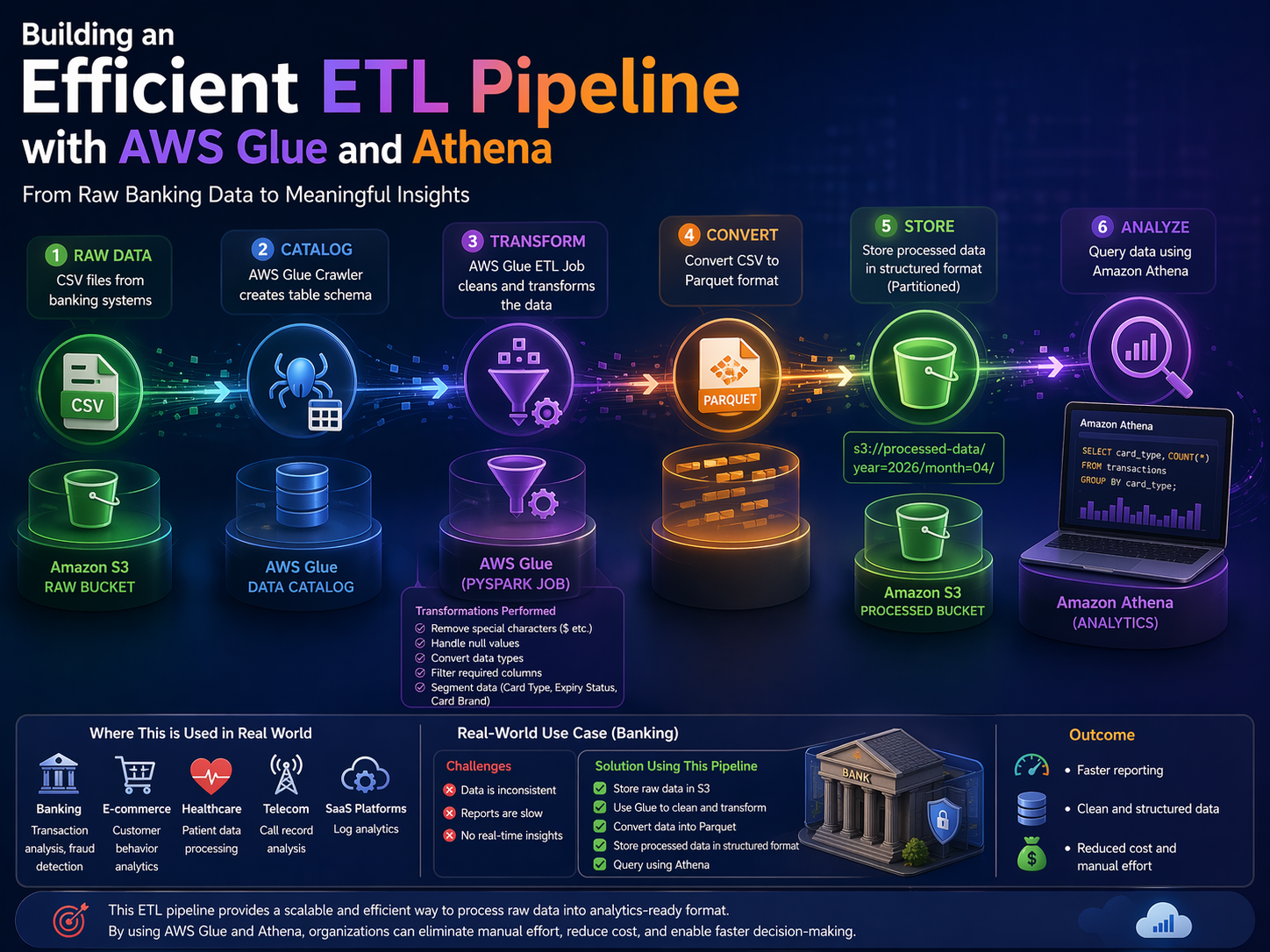
Step 1: Data Storage in Amazon S3
1. Create two S3 buckets (or folders):
1. Raw Layer → Store original CSV files
2. Processed Layer → Store transformed data Why:
This separation ensures:
1. Data integrity (raw data is untouched)
2. Easy reprocessing if something fails
Step 2: Create AWS Glue Data Catalog
1. Use Glue Crawler to scan raw data in S3
2. Automatically create a table schema
Why:
1. Makes raw data queryable and structured
2. Eliminates manual schema definition
Step 3: Data Transformation using AWS Glue (PySpark Job)
Create a Glue ETL job and perform:
- Data Cleaning
1. Remove symbols like $
2. Handle null values
- Data Transformation
1. Convert data types (string → numeric/date)
2. Filter required columns
- Data Segmentation
1. Split data based on:
1. Card type
2. Expiry status
3. Card brand Why:
Transforms raw data into usable and meaningful datasets
Step 4: Convert CSV to Parquet Format
1. Store transformed output in Parquet format Why Parquet:
1. Columnar storage → Faster queries
2. Compression → Lower storage cost
3. Optimized for analytics
Step 5: Store Processed Data in S3
1.Save output in structured folders like:
Why:
1. Enables partitioning
2. Improves query performance in Athena
Step 6: Query Data using Amazon Athena
1. Create a table on processed data 2. Run SQL queries directly on S3 Example:
SELECT card_type, COUNT(*)
FROM transactions
GROUP BY card_type;
Why:
1. No database setup required
2. Instant insights using SQL
Where This is Used in Real World
This architecture is widely used in:
1. Banking → Transaction analysis, fraud detection
2. E-commerce → Customer behavior analytics
3. Healthcare → Patient data processing
4. Telecom → Call record analysis
5. SaaS platforms → Log analytics
Real-World Use Case (Banking)
A bank receives daily transaction data in CSV format.
Challenges:
1. Data is inconsistent
2. Reports are slow
3. No real-time insights
Solution Using This Pipeline:
1. Store raw data in S3
2. Use Glue to clean and transform
3. Convert data into Parquet
4. Store processed data in structured format
5. Query using Athena
Outcome:
1. Faster reporting
2. Clean and structured data
3. Reduced cost and manual effort
Wrapping Up
Creating an ETL pipeline using AWS Glue and Athena has been a fulfilling experience. By leveraging both script and visual jobs, I built a robust and efficient data processing workflow.
Transforming raw banking transaction data into a clean and queryable format now allows me to derive actionable insights and make informed decisions. This project not only boosted my technical skills but also deepened my understanding of modern data pipelines.
If you are considering building your own ETL pipeline, I strongly encourage you to explore what AWS Glue and Athena can offer. They provide powerful tools to simplify your data processing and analytics, unlocking the true potential of your data.
Visual-Job-Sample-Output: