

Introduction
Managing SAP HANA backups efficiently is critical for ensuring data durability, cost optimization, and operational reliability. In production environments, it’s important not only to store backups securely but also to automate cleanup to avoid unnecessary storage consumption.
In this blog, we’ll walk through how to:
- Sync SAP HANA backup files to Amazon S3
- Validate successful sync operations
- Automatically delete large local backup files (>100GB)
- Trigger post-processing scripts
- Maintain proper logging for audit and troubleshooting
-------------------------------------------------------------------------------------------------------------------------------------------------------------------------------------------
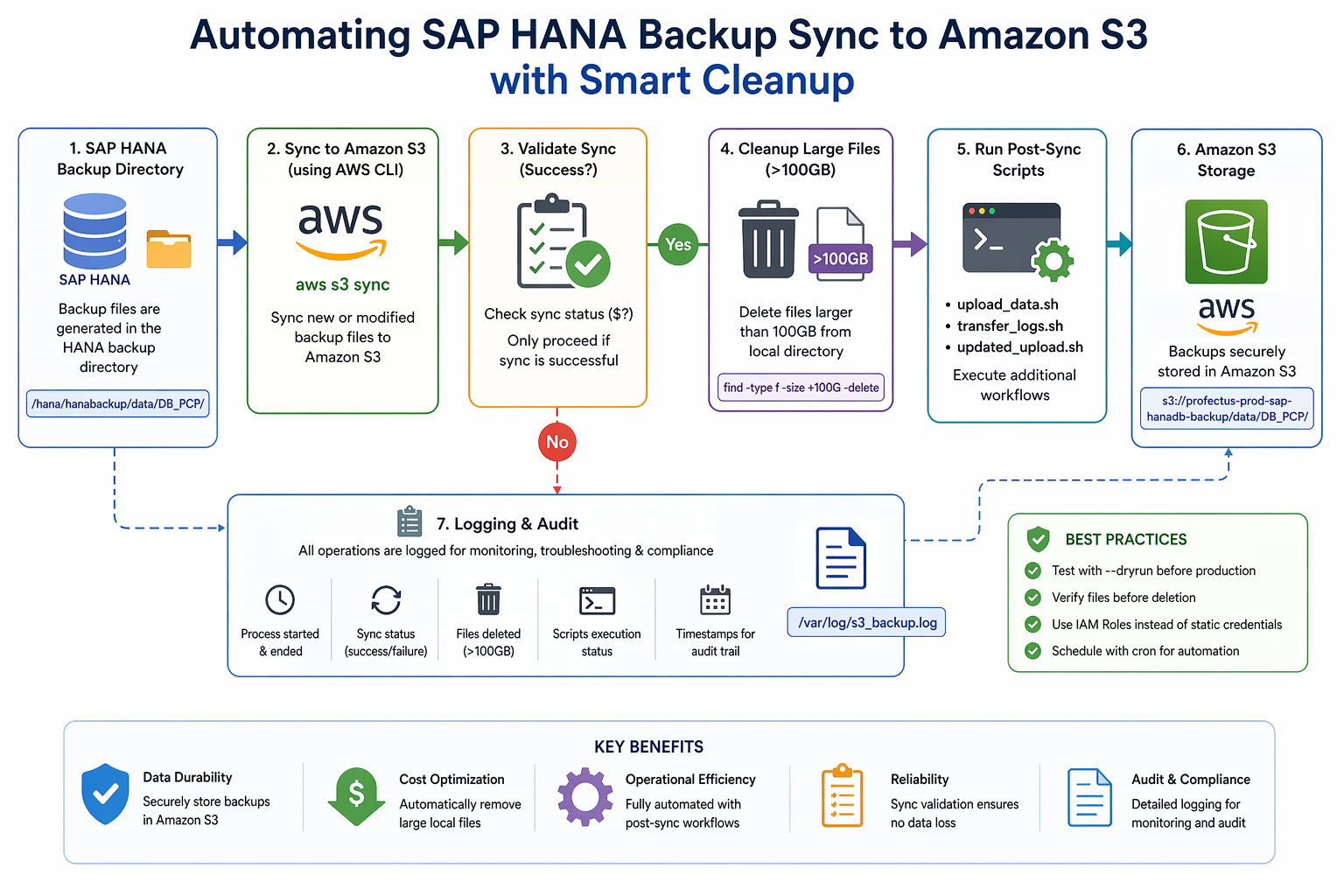
Architecture Overview
The workflow is simple yet effective:
- Backup files are generated in the HANA backup directory
- A shell script syncs these files to Amazon S3
- If the sync is successful:
- Large files (>100GB) are deleted locally
- Additional scripts are executed
- All operations are logged for monitoring.
-------------------------------------------------------------------------------------------------------------------------------------------------------------------------------------------
Prerequisites
left
Before implementing the solution, ensure:
- AWS CLI is installed and configured
- IAM role or credentials have access to S3
- Proper permissions on backup directories
- Passwordless sudo configured (for script execution)
-------------------------------------------------------------------------------------------------------------------------------------------------------------------------------------------
Script Implementation
Below is the complete automation script:
left
#!/bin/bash
LOG_FILE="/var/log/s3_backup.log"
SOURCE_DIR="/hana/hanabackup/data/DB_PCP/"
S3_BUCKET="s3://profectus-prod-sap-hanadb-backup/data/DB_PCP/"
echo "===== Process started at $(date) =====" >> "$LOG_FILE"
echo "Starting S3 sync..." >> "$LOG_FILE"
/usr/bin/aws s3 sync "$SOURCE_DIR" "$S3_BUCKET" >> "$LOG_FILE" 2>&1
SYNC_STATUS=$?
if [ $SYNC_STATUS -eq 0 ]; then
echo "Sync successful. Deleting files larger than 100GB..." >> "$LOG_FILE"
find "$SOURCE_DIR" -type f -size +100G -print -delete >> "$LOG_FILE" 2>&1
echo "Large files deleted at $(date)" >> "$LOG_FILE"
echo "Running post-sync scripts..." >> "$LOG_FILE"
sudo sh /hana/hanabackup/log/scripts/upload_data.sh >> "$LOG_FILE" 2>&1
sudo sh /hana/hanabackup/log/scripts/transfer_logs.sh >> "$LOG_FILE" 2>&1
sudo sh /hana/hanabackup/log/scripts/updated_upload.sh >> "$LOG_FILE" 2>&1
echo "Post-sync scripts completed at $(date)" >> "$LOG_FILE"
else
echo "Sync failed. No deletion or script execution performed." >> "$LOG_FILE"
fi
echo "===== Process ended at $(date) =====" >> "$LOG_FILE"
-------------------------------------------------------------------------------------------------------------------------------------------------------------------------------------------
Key Features Explained
1. Reliable Sync Using AWS CLI
left
The script uses aws s3 sync to ensure:
- Only new or modified files are uploaded
- Efficient transfer of large HANA backup files
-------------------------------------------------------------------------------------------------------------------------------------------------------------------------------------------
2. Success-Based Cleanup
Instead of blindly deleting files, the script:
- Checks the sync status ($?)
- Deletes files only if sync is successful
left
This ensures no data loss.
-------------------------------------------------------------------------------------------------------------------------------------------------------------------------------------------
3. Smart File Deletion
The command:
left
find "$SOURCE_DIR" -type f -size +100G -delete
left
Ensures:
- Only large backup files (>100GB) are removed
- Smaller files remain intact
-------------------------------------------------------------------------------------------------------------------------------------------------------------------------------------------
4. Logging for Audit & Troubleshooting
left
All operations are logged in:
left
/var/log/s3_backup.log
left
This helps in:
left
- Debugging failures
- Tracking backup operations
- Audit compliance
-------------------------------------------------------------------------------------------------------------------------------------------------------------------------------------------
5. Post-Sync Automation
After successful sync and cleanup, the script triggers:
- upload_data.sh
- transfer_logs.sh
- updated_upload.sh
left
This allows chaining additional workflows like:
- Log archival
- Secondary transfers
- Data processing
-------------------------------------------------------------------------------------------------------------------------------------------------------------------------------------------
Best Practices
🔹 Always Test with Dry Run
left
Before production:
aws s3 sync <source> <destination> --dryrun
-------------------------------------------------------------------------------------------------------------------------------------------------------------------------------------------
🔹 Verify Files Before Deletion
find "$SOURCE_DIR" -type f -size +100G
-------------------------------------------------------------------------------------------------------------------------------------------------------------------------------------------
🔹 Use IAM Roles Instead of Static Credentials
Avoid hardcoding AWS credentials for better security.
-------------------------------------------------------------------------------------------------------------------------------------------------------------------------------------------
🔹 Schedule with Cron
Example:
0 2 * * * /home/ec2-user/s3_backup.sh
-------------------------------------------------------------------------------------------------------------------------------------------------------------------------------------------
Conclusion
left
Automating SAP HANA backup management using AWS S3 and shell scripting significantly improves:
- Operational efficiency
- Storage optimization
- Reliability of backup workflows
left
By combining sync validation, conditional cleanup, and automation, you can build a robust and production-ready backup pipeline.
-------------------------------------------------------------------------------------------------------------------------------------------------------------------------------------------